

4K Video Downloader Plus Pro for Mac is a powerful video downloading application designed for macOS users who want to save online videos, playlists, channels, subtitles, and audio files with just a few clicks. Whether you’re downloading educational content, tutorials, podcasts, or entertainment videos, this software offers a fast and user-friendly experience.
Unlike many web-based downloaders, 4K Video Downloader Plus Pro provides higher download stability, supports multiple resolutions up to 8K (when available), and allows batch downloading from supported websites. Its clean interface and advanced features make it a reliable choice for students, content creators, professionals, and everyday users.
Features
Download Videos in High Quality
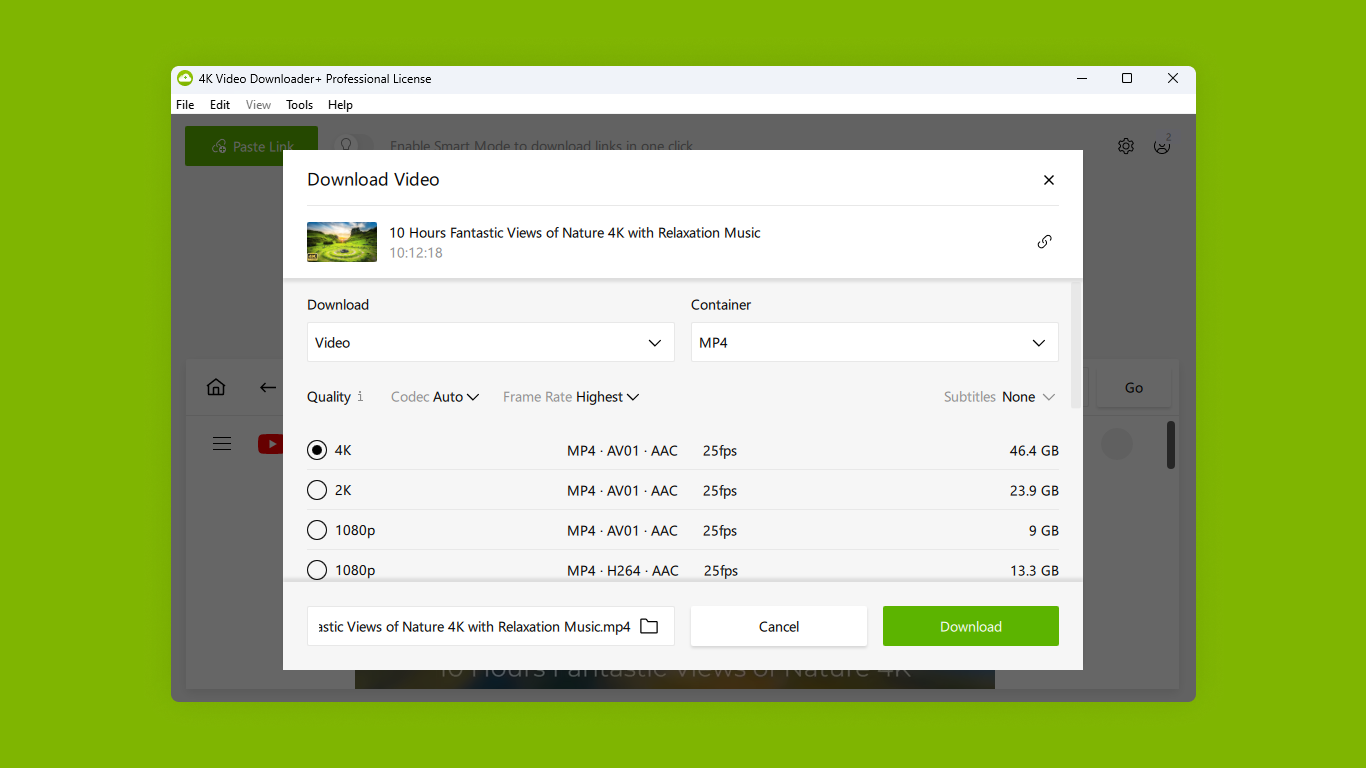
The application supports downloading videos in multiple resolutions, including HD, Full HD, 4K, and even 8K where available. This ensures you always get the highest possible quality.
Save Entire Playlists and Channels
Instead of downloading videos one by one, users can save complete playlists or entire channels, making it ideal for educational courses and favorite creators.
Audio Extraction
Need only the audio? The software can extract MP3, M4A, or OGG audio from supported videos without requiring additional tools.
Subtitle Downloads
Download subtitles in multiple languages or embed them directly into your downloaded videos for easier viewing.
Smart Mode
Smart Mode lets you apply your preferred download settings automatically, saving time when downloading multiple files.
Batch Downloads
Download multiple videos simultaneously while maintaining stable download speeds.
Built-in Proxy Support
The application supports proxy connections, helping users maintain better download reliability when required.
Cross-Platform Compatibility
Although this guide focuses on macOS, the software is also available for Windows and Linux users.
User-Friendly Interface
Even first-time users can navigate the software without technical knowledge thanks to its clean and intuitive design.
Regular Updates
Frequent updates improve compatibility with supported websites and enhance overall stability.
What’s New
Recent versions of 4K Video Downloader Plus Pro introduce several improvements aimed at performance and usability.
Improved Download Engine
Downloads are now faster and more stable, especially for larger playlists.
Better macOS Compatibility
The software has been optimized for newer macOS releases and Apple Silicon (M-series) Macs.
Interface Improvements
Small UI refinements make navigation smoother while keeping the application lightweight.
Bug Fixes
Several minor bugs affecting downloads, subtitles, and playlist management have been resolved.
Enhanced Website Support
Support for additional video sources and improved compatibility with existing platforms helps ensure a smoother downloading experience.
Best Alternatives
If 4K Video Downloader Plus Pro doesn’t meet your needs, consider these alternatives:
1. Downie
One of the best premium video downloaders for macOS with broad website compatibility and an elegant interface.
2. PullTube
Offers quick downloads, browser integration, and easy audio extraction for Mac users.
3. Any Video Converter Ultimate
Supports downloading, converting, editing, and compressing videos in one application.
4. ClipGrab
A free and lightweight downloader suitable for casual users who need basic downloading features.
5. Folx Download Manager
Combines download management with torrent support and browser integration for macOS.
Pros and Cons
Pros
- Clean and beginner-friendly interface
- Supports HD, 4K, and 8K downloads
- Batch downloading available
- Playlist and channel downloads
- Subtitle support
- Audio extraction included
- Smart Mode simplifies repetitive tasks
- Optimized for Apple Silicon Macs
Cons
- Some premium features require a paid license
- Website support may occasionally require software updates
- No built-in video editing tools
- Certain websites may have download restrictions
System Requirements
Before installing 4K Video Downloader Plus Pro on your Mac, ensure your system meets these general requirements.
| Requirement | Details |
|---|---|
| Operating System | macOS 10.15 Catalina or later |
| Processor | Intel or Apple Silicon |
| RAM | 4 GB minimum (8 GB recommended) |
| Storage | Around 300 MB free disk space |
| Internet | Required for downloading videos |
| Display | 1280 × 800 or higher |
How to Install
Installing 4K Video Downloader Plus Pro on macOS is straightforward.
- Download the latest macOS installer from the official website.
- Open the downloaded DMG file.
- Drag the application into the Applications folder.
- Launch the app from Applications.
- If prompted by macOS security settings, allow the application to open.
- Activate your Pro license if you have purchased one, or continue using the available edition.
- Copy a supported video link, paste it into the application, choose your preferred quality, and begin downloading.
Download 4K Video Downloader Plus Pro for macOS

FAQs
- Is 4K Video Downloader Plus Pro available for Mac?
- Yes. It is fully compatible with macOS and supports both Intel-based and Apple Silicon Macs.
- Can I download entire playlists?
- Yes. The software allows downloading complete playlists and channels from supported websites.
- Does it support subtitle downloads?
- Yes. You can download subtitles separately or embed them into supported video files.
- Is the Pro version worth buying?
- If you frequently download playlists, channels, high-resolution videos, or require advanced features, the Pro version provides additional functionality that can justify the upgrade.